A live overlay that reads another program's screen and does the math on what it finds.
I wanted to get better at poker, and what I needed was something that would tell me which starting hands to play from which position. That was the whole idea. It snowballed for two years. It began as HTML, CSS and JavaScript, picked up Python along the way, and ended up rewritten in C++, which had more to do with what the job kept asking for than with any of those being the point.
It was also the first thing I ever built with AI, back when ChatGPT was a browser tab and nothing else. I would describe what I wanted, it would write code, I would come back and say what the thing actually needed to do, and it would adjust. That loop is how I learned to code. Not pointing at a problem and hoping, but getting to where I understood why a line was written the way it was and why a function was shaped the way it was.
It reads a poker table, and that part is incidental. What it does is take a program that gives you no way to get data out of it, read the screen it puts in front of you, and calculate against what it finds while the thing is still happening.
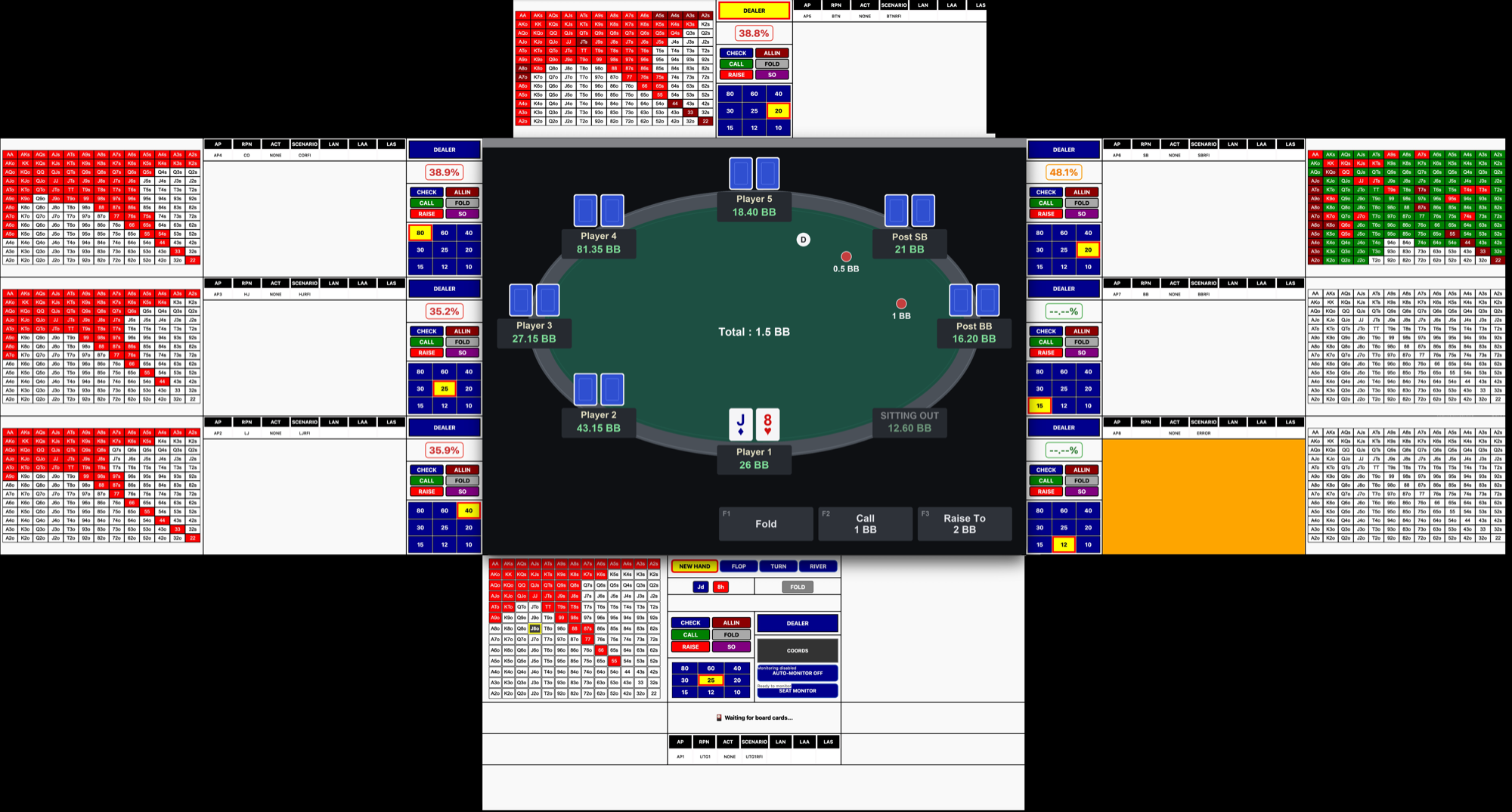
Reading the screen
On-screen text recognition across eight positions at once, tuned per zone. Pattern recognition for card faces and for whether a seat has anyone in it. Pixel-level colour detection for the smallest targets, down to single pixels for card suits.
Constant monitoring
Continuous monitoring on its own timer. Automatic state detection picks up the start of a new round from a marker moving on screen. Change detection tells one kind of action from another by comparing the amounts before and after.
Calculations on the spot
Live probability calculation against the current state, recalculated every time new information lands. A simulation engine underneath doing the heavy work, threaded so it keeps pace with the screen.
Card-by-card impact analysis for how every unknown left in the deck would change the outcome. Hand evaluation for where you stand right now.
Decision lookup
Decision tables, nine of them, 131 situations in each, keyed on your position and everything that happened ahead of you. Automatic table selection picks which one applies from what is in play.
Display outputs
Overlay windows alongside the program, one per position. Colour-coded grid displays showing every possible holding at once. Per-position recommendations for the call.
Calibration you can do yourself
A visual calibration tool draws every zone it reads as a box on the screen. Click one, drag it, pull the corners to resize it, nudge it a pixel at a time with the arrow keys.
Live reload puts a save into effect on the next pass. Automatic backup on every write.
I built it against recordings of live games, and it has never been used in one. The question was always whether it could be done at all, and how far I could take it once I got going.
Somewhere in those two years it became something that would give a player a real edge, and that is the reason it stays where it is. A demo means running it against a live site while real people are at the table, and I am not going to do that. It also only lays out properly across a monitor I do not currently own.
So the picture above is a hybrid, and I would rather say that than let you assume otherwise. Every panel is a real screenshot of the software doing its job. The table in the middle is one I drew to replace the real one, because publishing somebody else's product was never the point of showing you mine.