Software that watches my home network and tells me who joined it and what is leaving it.
I did not trust my neighbors. I wanted to know what was sitting on my wifi, and the obvious app for it, Fing, caps its free tier at three scans a day. Three scans a day cannot tell you that something joined at two in the morning and was gone before breakfast. So I built one that does not stop.
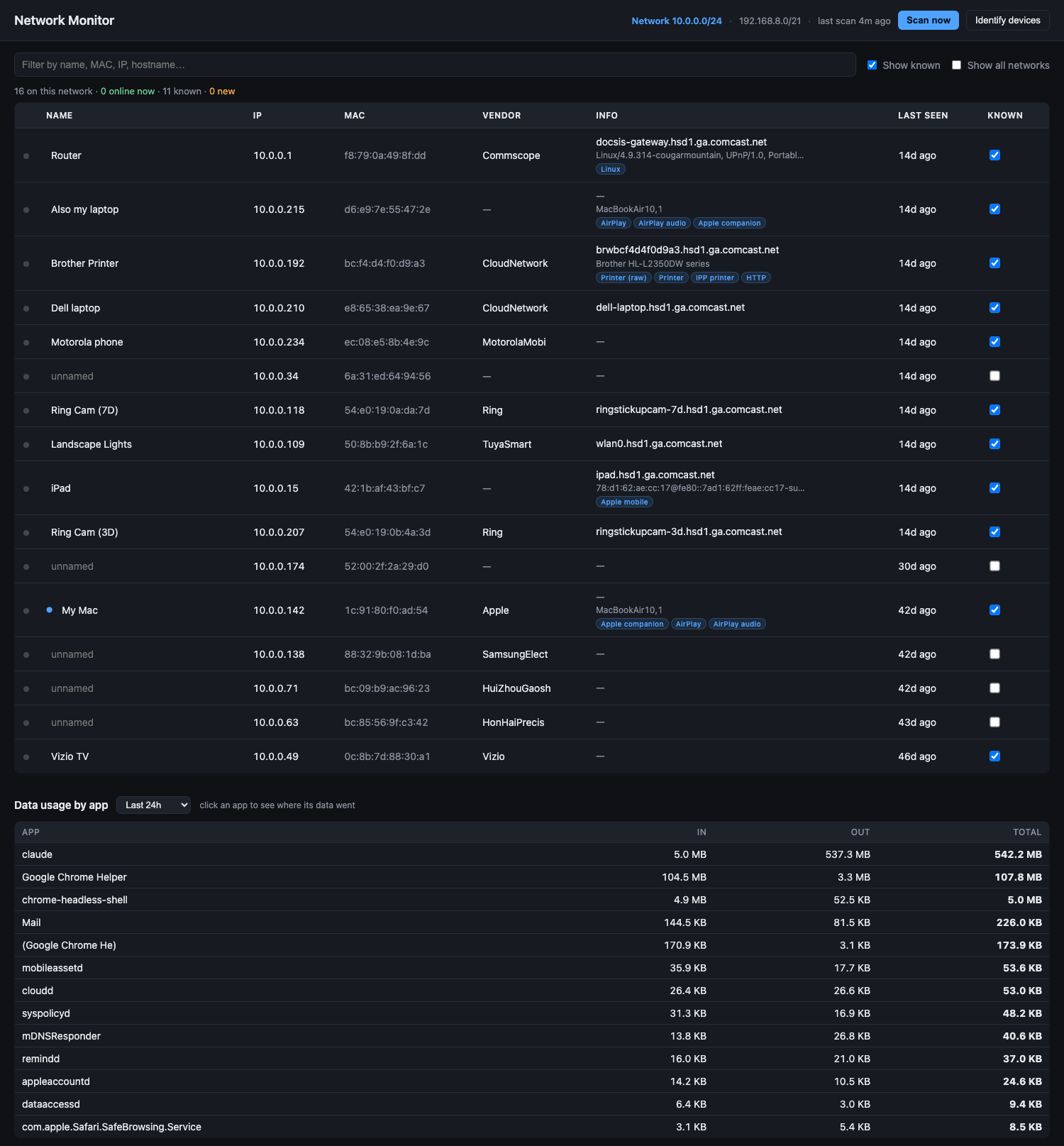
It runs on my Mac and I open it from my phone. It pings every address on the network, records whatever answers, and keeps everything it has ever seen. Sixteen devices on my home network, eleven of which I named by hand.
The first night I ran it, something I did not recognise showed up at 10.0.0.158. I named it Suspicious. It was gone four hours later and it has not come back.
Knowing what is on it
Continuous scanning. Every two minutes it pings every address on the network and records whatever answers back.
Device history, which holds the first and last time it saw each thing, so something that appeared once at three in the morning is still in the record weeks later. New device alerts as real notifications on the Mac, fired while whatever joined is still connected. Online status on every device, and a 24-hour activity timeline per device showing the hours it was actually there.
Working out what a device actually is
A hardware address on its own tells you nothing.
Hardware vendor lookup against a bundled database of thirty nine thousand manufacturer prefixes, so an unknown number resolves to Ring, Vizio, Brother or Motorola without asking anyone. Device identification that asks the network itself, reading what each device advertises about what it is and what a web request to it answers with. Service detection that names what came back: AirPlay, Chromecast, printers, HomeKit, Spotify Connect, VNC and about a dozen more. Port scanning on demand, twenty four common ports, for the ones that stay a mystery.
Telling one network from another
I move around, and the thing came with me. The device list turned into every network I had ever touched, stacked on top of each other, and stopped being any use.
Network fingerprinting by the router's own hardware address, which is the one thing about a network that holds still. Automatic network naming, and per-network views, so it shows me the network I am on and keeps the rest.
Where the data is going
Then a different question. Data was draining off a hotspot faster than anything I was doing could explain, and nothing on the machine would tell me which app was responsible.
So it got a second half. Per-app data usage, sampled every thirty seconds. A per-destination breakdown, so you open an app and see the hosts it actually talked to. Fourteen days of history, which means the question gets answered out of the log rather than needing to catch it happening.
Running unattended
An always-on background service that starts at login and restarts itself if it dies. Phone access from anything on the same wifi. That is why it is a web page: I wanted to be able to check it from the couch. Local-only storage, so everything it records stays on the machine, in a database file I can open.
Three things, and I went looking for none of them.
A code editor extension was uploading my entire workspace to its own cloud, continuously, about two gigabytes of it. Every per-process tool on the machine reported nothing at all, because of the way that traffic gets sent. I found it by closing one app at a time and watching the interface counter until the number dropped and stayed down.
A background agent I had installed months earlier and forgotten was phoning home. The traffic monitor showed it on the first run and it was gone the same day.
And my own database server was sitting open to the network, which I found by pointing the port scanner at my own Mac.